See a green dot on your Android phone? Here is what it means!
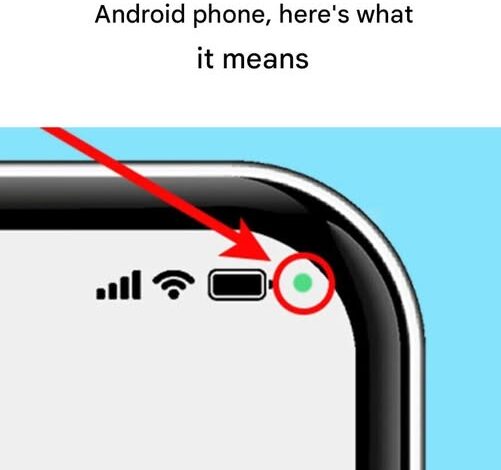
In the rapidly advancing digital landscape of 2026, our smartphones have become intimate extensions of our personal lives, containing everything from our private conversations to our banking details. As we navigate this era of hyper-connectivity, the importance of digital autonomy has never been higher. For Android users, specifically those within the Samsung ecosystem, a small but significant feature has recently become a frequent topic of conversation: the mysterious green dot appearing in the upper right corner of the screen. While it may seem like a minor UI tweak, this tiny luminous indicator is actually a powerful guardian of your personal privacy, serving as a real-time auditor of your device’s most sensitive hardware.
Modern mobile operating systems have evolved to become far more transparent about how applications interact with your physical environment. Much like the privacy indicators found on the iPhone, Google and Samsung have implemented these alerts to provide users with an immediate sense of control. The green dot is essentially a “live” broadcast of your phone’s internal activity. In the past, a malicious or poorly coded app could theoretically activate your camera or microphone in the background without any outward sign of activity. In 2026, that “silent” intrusion is no longer possible.
The presence of the green dot signifies a very specific event: an active application is currently accessing either the device’s microphone, its camera, or both simultaneously. On an Android device, this single green icon serves as a unified alert for all sensory inputs. This differs slightly from the iOS experience, which utilizes an orange dot for the microphone and a green one for the camera. By consolidating these alerts, Android provides a streamlined notification that asks the user to pause and consider whether the current activity on their phone justifies the use of these sensors.
For most users, seeing the green dot is a routine part of daily life. If you are in the middle of a video call, recording a voice memo, or snapping a high-resolution photo for social media, the dot is a comforting confirmation that the hardware is functioning as intended. However, the true value of the feature lies in the moments when you are not actively using a multimedia app. If you are simply scrolling through a text-based news feed or your phone is sitting idle on a desk and that green light flickers to life, it serves as a digital red flag. It suggests that a background process—perhaps one you haven’t authorized or one that is behaving unexpectedly—is “listening” or “watching.”
To empower users, Samsung and Android have made this feature interactive rather than just decorative. Investigating the source of the alert is a straightforward process that should become a standard part of any user’s digital hygiene. When the green dot appears, it often starts as a small icon depicting a camera or microphone before shrinking into the dot. To identify the “culprit” app, you simply need to swipe down from the top of the screen to reveal the notification shade. At the top of this menu, tapping on the green icon will trigger a dialog box. This box explicitly names the application currently utilizing the sensor.
This transparency allows for immediate decision-making. If the app named is one you trust and are currently using, you can simply dismiss the notification and continue your task. However, if the dialog box reveals an app that has no business accessing your microphone—such as a simple calculator or a basic puzzle game—it provides a clear path to corrective action. This level of insight is crucial in an age where data mining and unauthorized surveillance are persistent concerns. It moves the user from a position of passive observation to one of active management.
If you discover an app is accessing your sensors without your explicit consent or a clear functional need, the next step is to dive into the device’s permission settings. Modern Android versions allow for incredibly granular control. You can choose to allow an app to access the camera “only while using the app,” “ask every time,” or “don’t allow” at all. For apps that appear to be overstepping their bounds, the most secure move is often to revoke the permission entirely or, if the app is no longer necessary, to uninstall it from the device. This “pruning” of applications not only enhances privacy but can also improve battery life and overall system performance, as fewer background processes are allowed to run unchecked.
The introduction of the green dot is part of a broader cultural shift in 2026 toward “privacy by design.” As we see in other sectors—from the intense scrutiny of political figures’ digital footprints to the ongoing debates about the ethics of AI surveillance—the public is no longer willing to accept “black box” technology. We want to know what our devices are doing, when they are doing it, and who is receiving that data. The green dot is a localized, personal version of this transparency. It is a tool for the “confident user,” someone who moves through the digital world with intention and refuses to let their technology operate in the dark.
Furthermore, this feature serves as a deterrent for app developers. Knowing that a user will be immediately alerted if a camera or microphone is activated, developers are incentivized to be more ethical and efficient with their code. It forces a conversation about “least privilege,” a security principle where an application is only given the minimum level of access necessary to perform its core function. When a developer knows their app will be “outed” by a green dot for unnecessary sensor use, they are more likely to respect the user’s boundaries.
Ultimately, the green dot is not something to be feared; it is something to be understood. It represents a significant victory for consumer rights in the digital age. It transforms the smartphone from a potential tool of surveillance into a transparent partner in our daily lives. By taking the few seconds required to check the notification and manage permissions, you are asserting your right to privacy in your most personal spaces.
In a world where we are constantly told that privacy is a thing of the past, features like the Android green dot prove that we still have the power to draw a line in the sand. It is a small light, but it shines with the weight of our digital autonomy. Whether you are a tech enthusiast or a casual user, embracing this feature allows you to navigate the complexities of 2026 with a sense of security and a clear understanding of exactly who is listening.